Selling: |
SilverFast Ai Studio for Storm scanners |
|||
|
|
||||
|
|
||||
| ID | 2009 | |||
| Categories | Software, Connection and Controlling | | |||
|
|
||||
| Short description | SilverFast Ai Studio for Storm scanners | |||
| Price (in €) | on request | |||
|
|
||||
| Manufacturer | ||||
| Model | --- | |||
| Year of manufacture | 0000 | |||
| Warranty until | --- | |||
|
|
||||
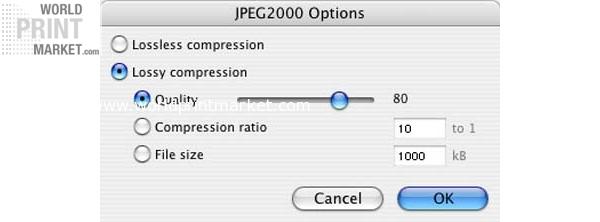
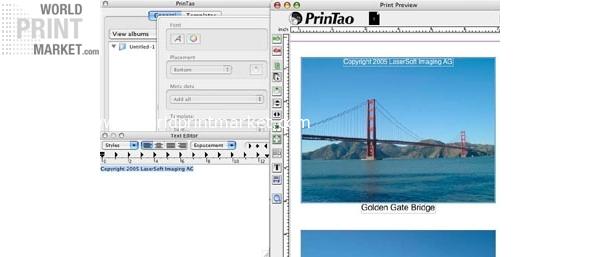
| Long description | SilverFast Ai Studio for Storm scanners This version only supports the following scanners / Die zum Verkauf stehende Version unterstützt nur die folgenden Scanner Modelle: Scan Pro Drummer SilverFast Ai as leading imaging software worldwide offers great tools for color reproduction to beginners and professionals. SilverFast Ai is individually adapted to the hardware of the scanners and can therefore get the very best out of your device. The innovative functions of the new SilverFast Ai Studio offer an even higher degree of efficiency for image optimization. Highlights New! SilverFast PrinTao the professional printing function AACO Auto Adaptive Contrast Optimisation Picture Setting Dialog The Clone Tool Unsharp mask PLUS JPEG 2000 support (16bit compression) Using IPTC data New! Multi Sampling PrinTao is the new professional printing function of SilverFast Ai Studio, SilverFast DCPro Studio and SilverFast HDR Studio, introducing layout functionality for images and text. For many workflow requirements, using an additional layout software wont be necessary anymore. Take advantage of PrinTao: You are able to create your individual layouts with text and images at a high efficiency. The integration of image processing, layout functionality and printing by a single software tool is unique. Positioning Images With PrinTao, images can easily brought to paper according to your own desires. Aside from printing single images, contact sheets with individually selected images can be printed as well. The images can be positioned either automatically or manually, with the help of grids and auxiliary lines. Images can be scaled, mirrored, rotated or cropped in their size. The images can be : freely positioned over auxiliary lines positioned and centered automatically rotated and mirrored scaled cropped adjusted to paper size zoomed and scaled within their own frame This way, an optimal, paper saving positioning is possible, reducing overall printing cost. Adding Text An individual text is assigned to each image. The text can be positioned above, underneath or besides the picture. The text can be aligned to the left, right or centered. Aside from custom text, information from the IPTC or EXIF meta data can be assigned to the images as well. Custom text can be added, which is freely selectable in its character font, size, style, color and adjustment. This, for example, makes it possible to easily create headlines. One of the most important functions is the input of a copyright text in desired form and size. With only one click, this important information can be added to as many pictures as desired. Creating Print Sheets When using PrinTao, a print job does not necessarily only consist of one page, containing text and images. PrinTao supports multi page print jobs, and each page can contain its own, individual layout and design. In order to work on fine details, it is even possible to zoom images directly on the page. This allows a very creative workflow. Creating Templates You dont have to start your layout from scratch PrinTao supports templates, allowing you to reduce repeptitive steps in your layour process. You can either use pre defined templates included in PrinTao, or create your own. Pre defined Templates: One pre defined template can be selected for all pages of the print job. Or, the user can assign a different template to each page. Importing images is as simple as a one key click or Drag&Drop. The images can be adjusted in their size or parts of the image can easily be cropped. User defined Templates: In order to create user defined templates, our pre defined templates can be used as a starting point, and modified to the users needs. It is also possible to create a user defined template by freely positioning text and images on the print sheet. True to color Printing Images can be printed true to color by selecting a printer and paper specific ICC profile as well as the appropriate Rendering Intent. ICC profiles describe the color spaces of the input and output devices, like scanners, monitors or printers. Rendering Intents are color conversion methods, with which one specifies, how a conversion between two color spaces is performed. PrinTao is now included as a standard feature in all current releases of SilverFast DCPro Studio and SilverFast HRD Studio. Users of earlier Version 6 releases are encouraged to download the latest one free of charge. |
|||
|
|
||||
| Weight | --- | |||
| Dimensions (LxWxH) | --- | |||
|
|
||||
| Location | Germany | |||
| Region | NRW | |||
|
|
||||
|
|
||||
|
|
||||
| View this article on the vendor's web site. | ||||